Basically I want to strike through some text; how can I do this?
Asked
Active
Viewed 4.4e+01k times
259
10 Answers
235
Ok, I have discovered a simple way. Copy this text and paste into your e-mail. Edit the text. Voila!

Val
- 5,903
- 6
- 26
- 29
137
This may not be for everyone (I work in web development), and it's slow, but if you use Chrome or Chromium you can edit the HTML directly and it works fine.
- Right-click on the text you want to strike out
- Choose 'inspect element'
- The inspector will bring up that text - right click on it and choose 'edit html'
- Wrap the text you want to strike out with
<strike>text</strike>


ale
- 52,972
- 42
- 165
- 314

doub1ejack
- 1,424
- 2
- 10
- 12
68
While this is a very old query, I have found a nifty way to work on it, thus posting it as a solution.
There is a shortcut Alt+Shift+5 to toggle the strike-through. Select the text to strike through, click once Alt+Shift+5 the text is stroked, click once more the text is back to normal.
For Mac: Cmd+Shift+x

Dhaval Shah
- 779
- 5
- 5
14
Personally, I type emails that need more formatting options in the CKeditor demo. Then, I copy the final text into Gmail - the formatting is retained.

Timothy Zorn
- 281
- 2
- 6
12
There is no native way to do it, so you either do it in Word (or any other text editor that supports it) and then copy/paste the text in the compose window or you install a browser add-on.

Alex
- 22,820
- 12
- 83
- 106

9
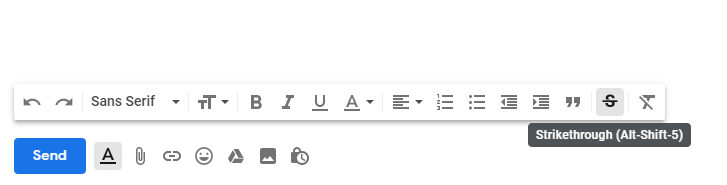
As of January 2019, you can use new Formatting options - Strikethrough (Alt-Shift-5):
3
I thought it would be clever to create a bookmarklet in Chrome that would modify the style of selected text using JavaScript.
Unfortunately, I couldn't get that to work, but if you're familiar with the console, you can paste this line into it to strikethrough any selected text:
window.getSelection().anchorNode.parentNode.style.textDecoration = "line-through"
To get to the console, you can right click anywhere in the HTML document of the Chrome Browser and choose "Inspect Element," or you can press "option / command / J" at the same time on a Mac machine.
F12 or "control - shift - J" opens up the console on PCs.
Once you've done this, the console will remember your command, and you can press the up arrow to cycle through past console commands. When you return to this particular one, just press enter again to apply it.

Jason Silver
- 131
- 4
3
January 22nd 2019, Google announced:
We're adding three new features to Gmail:
- Shortcut to undo/redo in the compose window
- Shortcut to strikethrough text
- Ability to download messages as .EML files in rfc822 format from Gmail on the web
from New Gmail compose formatting and download options in the official G Suite Updates blog.

Rolando Isidoro
- 131
- 4

