I can personally confirm that at least as of today, google will add jumplinks for singlepage scrolling sites...but I have not found a way to get sitelinks for a single-page site.
To get jumplinks working you should have:
- anchors
href="#idOfContent" with anchor text (or alt text for image links) which you want to show on google as a jumplink.
- document elements with corresponding IDs to the URL fragment.
In the example below the jump links are Section Title 1,3,4:
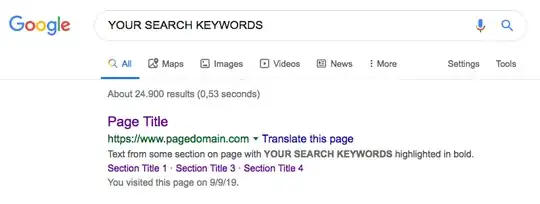
details...
I thought I had "site links" but apparently only have "jump links" for my single page site.
Jump links are provided for single page sites if you have the anchors and things setup properly. Haven't found any docs from google about them yet though which is strange.
If your single page site uses url fragments (#sectionid) you may be out of luck for site links. However there are some client-side js frameworks ("single page app" type stuff) that can work with normal URIs (e.g. /path/to/page). Basically you configure your webserver (nginx or whatever) to return the same file for every URI requested. The client-side javascript parses the current URI and decides which content to load...for instance load same content but different section is at the top of the window.
The problem with this is that google will see the same content on all these supposedly different pages (different URIs) and will likely penalize you in search results or only show one of your pages. So if it is really a Single-Page-App, just make sure each URI is displaying different content and not just scrolling to different content.
The other problem is that if you really just have a single page scrolling site...using in-page links with url fragments is really the right way to do it as url fragments are intended to link to a location within a single document (think table of contents at top linking to specific sections farther down in page/document).
Another potential problem with a Single-Page-App using different URIs (/path/to/content rather than /app#contentId) is that web browsers will think these are all different pages and cache them independently even though your webserver may be returning the same app content/code for all the different requests and only fetching unique content on subsequent requests.
Moral of the story:
single page site with jumplinks is great for very basic marketing/corporate websites where you don't have that much content. However as your site content expands it really does make sense to add more pages in order to group similar content together (e.g. products page, pricing page, login page, etc would make sense to be different than the home page).
If you have a "single page app" that is really a multi-page site (google search docs (3) calls this the app shell model)... then you should do what I suggested above and have your singlepage app use the URI instead of the URL fragment to determine which content/page to show. Different URIs should show different content, different page titles, different page meta descriptions, etc.
Don't confuse sitemaps (e.g. sitemap.xml) with sitelinks.
Sitelinks are a google-specific thing which are sub-links to individual pages/sections under your main website search result.
sitemap.xml is a data file describing all the pages in your site making it easier for code/bot to understand and discover your site pages without having to "crawl" (fetch starting page, execute javascript, find/parse links, follow links to new pages and repeat).
sitemap (sitemap.xml)
Google Webmaster tools will allow you to submit a sitemap. This is really only necessary if for some reason you think that google's crawler may have trouble discovering all your pages.
This is most likely to be a problem if you are using javascript based navigation, using javascript to render your links at some point after page load or are using non-standard markup for links/navigation. You will also have problems providing a sitemap if you cannot provide a list of unique urls that each load unique content (e.g. because your content only changes in response to javascript function calls).
Providing google webmaster tools a sitemap will help their crawler to discover your pages in order to crawl them (ie if for some reason google can't find all your pages via following links from your home page).
If google can't find/crawl your pages without a sitemap.xml...then this will of course prevent google from generating sitelinks. Besides that sitelinks and sitemaps are not related.
...when you have content not readily linked by other pages, such as new pages or obscure information, you can help our system learn about your URLs by providing them in a list, known as a sitemap. (2)
sitelinks
According to google (1) the sitelink generation process is automated based on their proprietary algorithms. This means you can't force sitelinks to show up, you can just try to do the right technical things to enable google to show sitelinks if they decide they want to.
Google may draw the content of sitelinks from page titles, anchor text (or alt text for image links), page meta-data, etc.
I like to think of sitelinks as just a way for Google to visually compress multiple search results from the same site into a single group result.


