7

I've been migrating to a new host (AWS Lightsail with a Ubuntu instance) and while everything is working just fine I'm running into a quirk that I can't quite figure out.

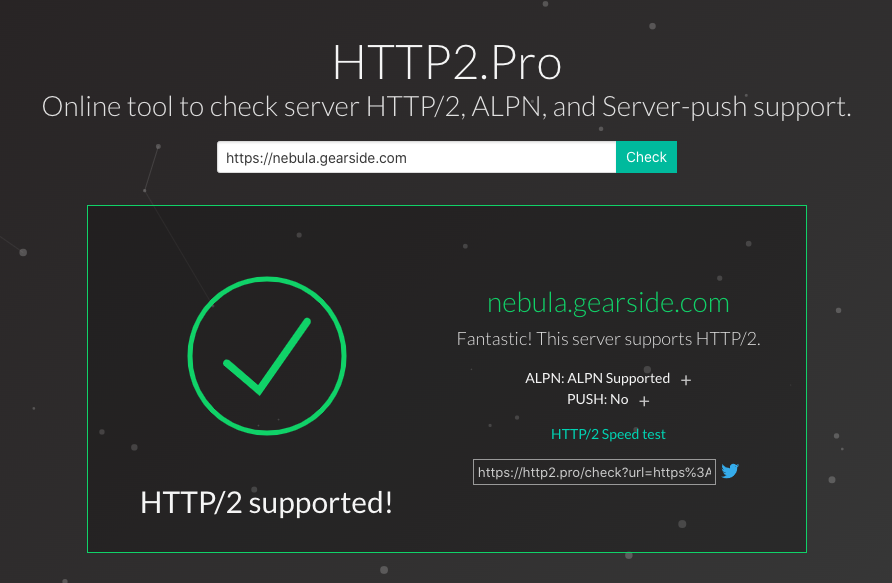
I've enabled HTTP2 on my virtual server and confirmed that files are using that protocol (via DevTools and http2.pro):

HTTP2 working in DevTools

HTTP2 working per http2.pro

For reference, here is my server showing the Apache HTTP2 mod is enabled (and I did restart apache afterwords)

http2 mod already enabled

However, in PHP when I output $_SERVER['SERVER_PROTOCOL'] on my server it is still showing "HTTP/1.1":


http1.1

php code

But this same exact software (WordPress theme) on other servers is showing "HTTP/2.0" correctly:

http2 detected with same exact code

I believe I have my Apache2 conf files setup correctly:

Port 443:

<VirtualHost *:443>
    Protocols h2 h2c http/1.1

and just to be thorough I did Port 80 as well:

<VirtualHost *:80>
    Protocols h2 h2c http/1.1

Unfortunately I do not have access to the conf files (or ssh) on the server that is working, so I can't cross-reference those files.

I've been reading a bunch of tutorials on HTTP2 to see if there is any additional setting or configuration that I may have missed, but most are showing the same instructions that I've implemented.

Can anyone point me in the right direction as to why this PHP "detection" is incorrectly displaying the protocol, or if there is something I missed that is preventing PHP from using HTTP2 in this one situation?

Stephen Ostermiller
  • 99,822
  • 18
  • 143
  • 364
GreatBlakes
  • 545
  • 3
  • 16

2 Answers2

5

This has to do with how Cloudflare connects to servers. Although it does serve the client via HTTP2 (or HTTP3), it still connects to the server itself via HTTP1.1.

Cloudflare only uses HTTP/1.x between the origin web server and Cloudflare.

https://support.cloudflare.com/hc/en-us/articles/200168076-Are-the-HTTP-2-or-SPDY-protocols-supported-between-Cloudflare-and-the-origin-server-#6ncFUWOVRaVtPzYN1euBIC

This particular post helped illuminate the issue for me: https://community.cloudflare.com/t/passing-the-correct-server-protocol-to-the-origin/82386

I wish Cloudflare made it more obvious on their HTTP/2 Network setting that this was the case...

GreatBlakes
  • 545
  • 3
  • 16
2

Thank you, the QA here helped me to solve my issue. Here are specifics in case others run into similar issues with PHP "detection" incorrectly displaying the protocol behind a proxy such as Cloudflare.

I found this Cloudflare SSL trick which would solve the issue for every php file executed. However, under a shared hosting environment I do not have access to modify php.ini

My issue cropped up in a Wordpress theme named Blocksy that relied on the PHP variable $_SERVER['HTTPS'] internally to generate a URL for loading its sticky.js component. This caused a mixed content warning blocking the js from operating under Cloudflare SSL. Under Wordpress, all php execution comes after wp-config.php so I added the following php in that file to solve this problem.

/* Cloudflare HTTPS help 
How this works - this will automatically run before WordPress
The following will check if cloudflare has set the HTTPS protocol forwarding header (HTTP_X_FORWARDED_PROTO) and will adjust the $_SERVER variables accordingly if so.
*/
if(!empty($_SERVER['HTTP_X_FORWARDED_PROTO']) && $_SERVER['HTTP_X_FORWARDED_PROTO'] === 'https'){
        $_SERVER['REQUEST_SCHEME'] = str_replace('http', 'https', $_SERVER['REQUEST_SCHEME']);
        $_SERVER['SERVER_PROTOCOL'] = str_replace('HTTP', 'HTTPS', $_SERVER['SERVER_PROTOCOL']);
        $_SERVER['HTTPS'] = 'on';
}
/* END  Cloudflare HTTPS help */
nsolent
  • 121
  • 3