9

I'm working with Moodle to export a csv file. The file is encoded as UTF-8 but Excel doesn't recognise it and so displays odd characters.

I've modified the code to insert a BOM as per https://stackoverflow.com/a/16231345/1603711

But I am unable to test it because I haven't got Excel installed.

I was hoping to use Excel online at https://office.live.com/start/excel.aspx but I can't find a way to import a csv file.

Is this possible?

ale
  • 52,972
  • 42
  • 165
  • 314
Russell England
  • 291
  • 1
  • 4
  • 8

8 Answers8

8

Is this possible?

Nope. The Excel Online App currently does not support importing/opening CSV files.

You'll have to convert it to XLSX first, which you could do using Libre/OpenOffice, or one of many online file converter services.

techie007
  • 272
  • 1
  • 7
6

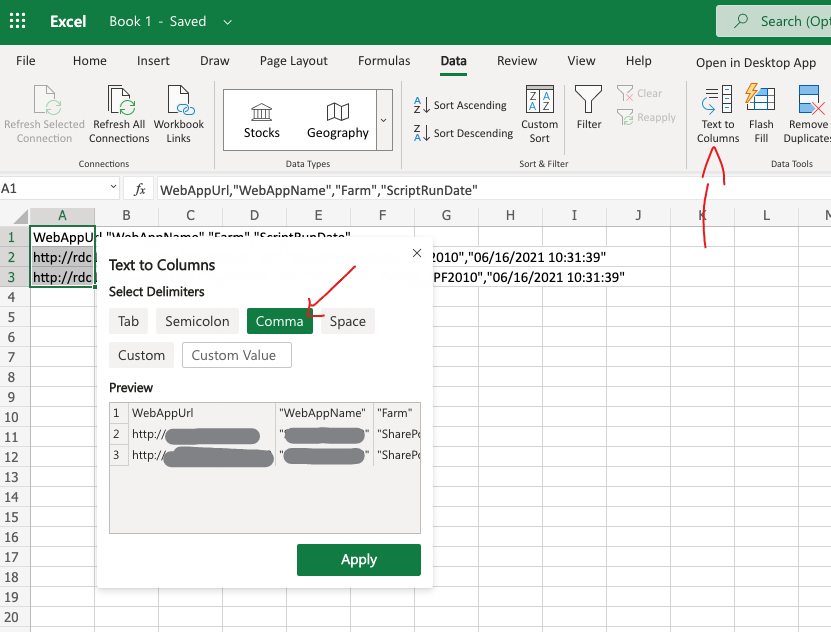
You can copy the CSV file contents and paste it on your online sheet and then use the "Text to column" feature. It is pretty easy actually.

using text to columns feature

Andre Morata
  • 161
  • 1
  • 1
3

The following steps worked for me:

  1. open csv file in notepad++
  2. replace all commas with tabs (you may have to enable search mode extended with \t)
  3. Select all and copy to the clipboard.
  4. open a blank excel file online
  5. copy contents of the clipboard.
  6. Excel should properly separate the tabs into separate cells
serenesat
  • 10,042
  • 30
  • 34
  • 50
1

Not really a solution per say, but if you can open your CSV file locally, you can just copy-paste it into Office Excel Online and it will properly format all the columns.

1

I just upload the csv to OneDrive, then open it up. It will automatically be converted to Excel and saved as an .xlsx. It is pretty easy.

Hector
  • 11
  • 1
1

Ran into the same issue a few moments ago and was somewhat surprised to find Excel Online doesn't support this. Was equally surprised to find this StackExchange post returned pretty high atop search engine results for keywords "excel for web import csv" and no mention of Google Sheets here.

Google Sheets (in-browser) supports importing CSV via File → Import and subsequently exporting via File → Download → Microsoft Excel (*.xlsx) once you've finished setting it up the way you want: which you can then open it in Excel Online from there.

Alternatively, you could look over the Add-Ins via Insert → Add-Ins within Excel Online directly and search for something that might work for you. There seems to be one in there called "CSV Import+Export" but I prefer not to install third-party software or plugins from an unrecognized source if I can get the same thing done with software I do recognize and trust (as outlined above).

Matt Borja
  • 163
  • 1
  • 1
  • 7
1

I made this script to convert csv data into a format with powershell that you can just paste into excel, I use this to graph my temperatures captured with iCUE...

#folder that contains iCue log files
$FOLDER = "D:\iCueLogs\*.csv"
#only select the single most recent log file
$recent = gci $folder | sort modifieddate | select -last 1

#import the csv into powershell object $array = import-csv $recent.FullName #sort the data by timestamp $DataArray = $array | sort Timestamp

#convert the data into a format that excel accepts pasting $a=$DataArray $a=$a|ConvertTo-Csv -NoTypeInformation #remove the celcius from temperature values so data is charted correctly in excel $a=$a.Replace('°C','') $a=$a.Replace('"','') $a=$a.Replace(",","`t") $a|clip

#now paste into Excel and ctrl+a in your data and it all gets selected then add chart

Will Smith
  • 11
  • 1
0

you can do it by uploading the CSV file to your drive and then drive will detect the format for you and open it with excel