5

I have a sufficient data-plan so I've never worried about this... tomorrow though, I'm travelling abroad. Due to this, I will have restricted 3g usage.

Are there any apps or Android settings to prevent certain applications from syncing in the background while allowing others to work unrestricted? For example, if I only want to use WhatsApp or check emails, without "Android OS" or Facebook playing around online, would this be possible?

If I could have this as a "roaming only" profile/mode would be an advantage. If I could also allow these applications to run as normal when WiFi is available, that would be a bonus!

My device is not rooted and I would prefer not to root it to achieve this. Are there any apps or solutions to achieve this?

Flyk
  • 435
  • 3
  • 8
  • 22
krasatos
  • 241
  • 1
  • 3
  • 7

2 Answers2

6

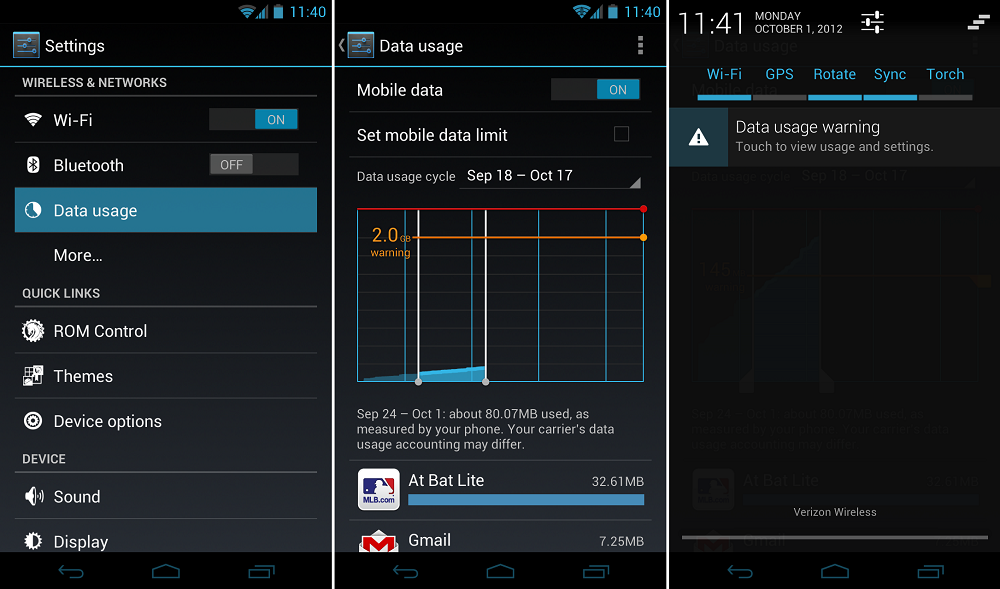
If your device is running at least Android 4.0, you can use Androids native data management:

Data Usage (click to enlarge)
Data Usage configuration on Android 4.0+ (source: Droid-Life.com, click image to enlarge)

Here you can setup an overall data volume (a requirement for the second step -- but one can set that rather high, like 4 GB): tick the Set mobile data limit checkbox, and play with the bars.

That done, select the apps to block (tap their entries you can see in the second screenshot at the bottom), and set their limit to 0 (scroll to the end of the app's page, and activate the checkbox labeled "restrict background data"). A popup will inform you that the app might stop when there's no WiFi available, as it will no longer be able to use background data on the mobile network -- plus that there might be additional controls inside the app itself.

Now these apps no longer can "silently eat your dataplan", but only when you actively trigger actions. You find described screens in the system settings, mobile data (the one with the pie-chart symbol -- see above screenshot).

P.S.: If the above is not applyable for you (Android <4.0, or a WiFi-only device with Android 4.3+), please also see my answer here.

Izzy
  • 91,536
  • 76
  • 351
  • 968
0

You could try using this app: Mobiwol: NoRoot Firewall

bmdixon
  • 8,805
  • 17
  • 44
  • 64