Re-phrasing your question to reflect your real problem:
How can I read my extensive, HTML-formatted documentation on my Android device?
there is an answer which would make it easy, comfortable, and even less storage-consuming:
You could convert the entire documentation to an eBook using Calibre on your PC. A good format would be e.g. ePub. As a result, your entire documentation would be packed into a single file. Now check the playstore for a nice eBook reader (my recommendation: Moon+ Reader or its payed version, Moon+ Reader Pro), and install it on your device. Et voila: You have your documentation available on your device. Added pluses (with Moon+ Reader): You can even set multiple bookmarks, highlight text, make annotations. And due to the integrated OPDS support and even pre-configured online libraries, you'd have a bunch of books at your fingertips.


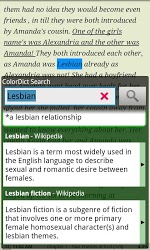
Adding a dictionary app like ColorDict Dictionary Wikipedia or Fora Dictionary plus some (freely available) dictionaries, you could even look up things whenever needed, online or offline, as the second screenshot2 shows.