69

I posted an ad on a website and when people respond, I get an email from post@example.com titled like this:

Reply to your "1999 Pontiac Sunfire - As Is" ad on Example.com

If two people reply to my advert in one day, I get two of these from the same bot sender and they end up in the same Gmail conversation, even though they're really from two different people.

Is it possible for me to "split" this conversation into two or more conversations so that I can keep track of which people I've replied to and who I have not?

ale
  • 52,972
  • 42
  • 165
  • 314
theycallmemorty
  • 1,076
  • 1
  • 7
  • 10

8 Answers8

37

Unfortunately it is not possible to split Gmail threads. However, you can mark some messages as "unread from here". When you reply, change the title and reply in a new composing window, so that at least the follow-ups are split.

Alex
  • 22,820
  • 12
  • 83
  • 106
neo
  • 5,233
  • 2
  • 30
  • 26
15

You can also turn off conversation view, which is a new Gmail feature as of today:

http://gmailblog.blogspot.com/2010/09/turn-off-gmails-conversation-view.html

Alex
  • 22,820
  • 12
  • 83
  • 106
Jeff Atwood
  • 3,343
  • 11
  • 40
  • 52
13

You could always forward the conversation to yourself with a new subject. You'll lose the original sender, but you can add that to the message body so it's still searchable.

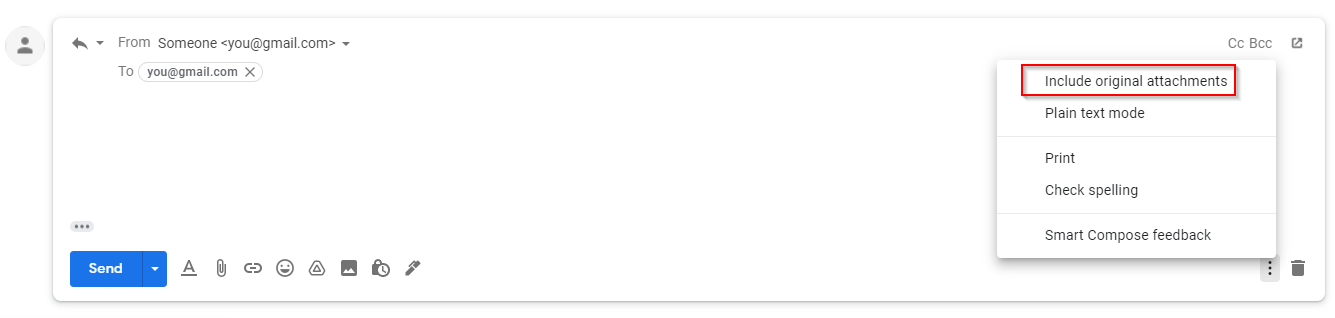
Also don't forget to include attachments when replying (if you want to keep them) enter image description here

Mark
  • 103
  • 3
Glycerine
  • 231
  • 2
  • 7
12

When replying you can change the subject, that will push the conversation from that point forward to a new conversation.

hpmc
  • 121
  • 1
  • 2
10

We (Streak) just added the ability to split up threads into smaller ones by selecting messages you want to move to a new thread. If you're still looking for this feature it may be helpful: https://www.streak.com/split-gmail-conversation-threads-break

aloo
  • 201
  • 2
  • 3
9

Yes, you can split conversations using a regular IMAP-client. Move one of the two messages to a different folder (label) using the IMAP-client and then move it back to the original folder (label).

If you set the draft flag in your external IMAP-client you can also edit the message to add keywords etc.

d-b
  • 817
  • 2
  • 11
  • 24
-3

Click on the cog icon and scroll down to and click on settings. Scroll down to "conversation view" and click to turn it off. Save at the bottom, log out then log back in and all of your emails will be separated regardless of subject :)

-5

Log into your Gmail.

Settings Tab

Simply click on the Settings Tab (Cog shaped wheel) as per the image above, then click on Settings. Scroll down to "Conversation View", select conversation view "On" button.

Scroll to bottom of screen and click on "Save Changes" tab.

You're done!

Sathyajith Bhat
  • 10,917
  • 8
  • 48
  • 78
Scott
  • 1
  • 1